The best Claude model depends on the job:
- the flagship model for the hardest reasoning, coding and research
- the mid-tier model for most everyday writing, analysis and work tasks
- the smallest, fastest model for quick answers and high-volume automated jobs
Most people should start on the balanced model their plan defaults to and switch up only when a task clearly needs more power. Some models are restricted-access and aren’t available to regular users at all. Below: the current lineup, what each model is for, what your plan includes, and a quick way to test models on your own work.
The lineup changes fast. Opus 5.5, Sonnet 5.5 and Haiku 5.5 all shipped between September 22 and October 7, 2026, so most guides written even a few months ago point to models that are no longer current. If you’re new to Claude itself, start with our guide to using Claude AI for beginners. This page assumes you already have an account and want to pick the right model.
Key terms used in this guide: context window and reasoning model.
The current Claude lineup
Anthropic’s model overview lists four current models, from the slowest and most capable to the fastest and cheapest. A fifth, Mythos 5.1, was released alongside Fable 5.1 but only for a closed group. If you’ve been weighing Claude Opus vs Sonnet vs Haiku, this table is the short answer.
| Model | Tier | Available on | Best for | Speed | Relative cost | Release date |
|---|---|---|---|---|---|---|
| Claude Fable 5.1 | Top tier | Paid plans (included on Max, usage credits on Pro), API | Demanding reasoning, long-horizon agents, deep research | Slower | Most expensive | Sept 1, 2026 |
| Claude Mythos 5.1 | Top tier, restricted | Vetted security organizations only, via Anthropic’s Cyber Verification Program | Defensive cybersecurity work by verified teams | Not listed | Same tier as Fable 5.1 | Sept 1, 2026 |
| Claude Opus 5.5 | Flagship | Pro, Max, Team, Enterprise, API | Complex coding, long agentic and knowledge work | Moderate | High | Sept 22, 2026 |
| Claude Sonnet 5.5 | Mid-tier | All plans including Free, API | Everyday writing, analysis, well-scoped coding | Fast | Mid | Sept 28, 2026 |
| Claude Haiku 5.5 | Fast | API and cloud platforms; Haiku is on every app plan | Classification, extraction, routing, subagents | Fastest | Cheapest | Oct 7, 2026 |
Last verified: October 8, 2026, against Anthropic’s models overview, Claude Platform release notes, model deprecations page and the plan table on claude.com/pricing.
Claude Fable 5.1 and Claude Mythos 5.1 launched together on September 1, 2026. Fable 5.1 is the most capable model you can actually use: Anthropic recommends it for demanding reasoning and long-horizon agent work, and suggests trying Opus 5.5 first for most jobs. Mythos 5.1 is reserved for verified security teams. Since October 6, 2026, access runs through Anthropic’s expanded Cyber Verification Program, which absorbed the earlier invitation-only Project Glasswing, so Mythos won’t appear in a regular Claude plan’s model menu.
All four current models share a 1M-token context window and 128K maximum output, according to Anthropic’s spec table. So the choice comes down to depth of reasoning, speed and cost, not to how much text a model can take in.
Pick by task
Start from the recommended model, then move one tier up or down based on what you see in the output.
| Task | Recommended model | Go up a tier when | Go down a tier when |
|---|---|---|---|
| Everyday writing and email | Sonnet 5.5 | The piece is high-stakes (a proposal, a tricky client reply) and the draft needs heavy edits: try Opus 5.5 | You’re rewriting short messages in bulk: Haiku 5.5 |
| Long documents and research | Sonnet 5.5 for reading and summaries | Conclusions have to hold across many sources: Opus 5.5, or Fable 5.1 for multi-day research | You only need names, dates or figures pulled out: Haiku 5.5 |
| Coding and Claude Code | Opus 5.5 | Large refactors or long autonomous sessions keep stalling: Fable 5.1 | Small fixes, tests and well-defined features: Sonnet 5.5 |
| Data analysis | Sonnet 5.5 | Multi-step modelling or messy data that needs judgment: Opus 5.5 | Tagging or cleaning thousands of rows: Haiku 5.5 |
| Quick, high-volume jobs and the API | Haiku 5.5 | Accuracy drops on the harder items: Sonnet 5.5 | Already the cheapest option |
| Agents and long multi-step tasks | Opus 5.5 | The agent runs for hours and small errors compound: Fable 5.1 | Steps are simple and repetitive: Sonnet 5.5, with Haiku 5.5 as a subagent |
Coding is where the top of the lineup earns its cost. Anthropic positions Opus 5.5 for long-running agentic coding and says it performs at the level of Fable 5.1 on most workloads. That’s the vendor’s own claim from the September 22, 2026 launch, so test it on your codebase before you rely on it. Our Claude Opus 5.5 review covers what changed from Opus 5. Anthropic positions Sonnet 5.5 for well-scoped everyday work such as bug fixes, documents and spreadsheets, and suggests Haiku 5.5 as a subagent that takes smaller pieces of a coding job. If you haven’t used the terminal tool yet, our Claude Code guide for beginners covers setup and first commands.
For writing, the gap between Sonnet and Opus is smaller than for code. Sonnet 5.5 handles emails, outlines, edits and summaries well. Opus pays off when the text depends on careful reasoning, like a strategy memo that has to reconcile conflicting data.
Long documents and data work follow the same logic. Sonnet 5.5 can read a long report or a large CSV and give you a solid summary. When the job is to weigh evidence across many files, spot contradictions or build a model with assumptions you’ll have to defend, Opus 5.5 is the safer pick. For pure extraction, such as pulling every invoice total from a folder of PDFs, Haiku 5.5 does the work faster and leaves more of your plan for tasks that need a stronger model.
Pick by plan
Your plan decides which models appear in the app and how much of each you can use.
| Plan | Models available | Default model |
|---|---|---|
| Free | Sonnet, Haiku | Sonnet |
| Pro | Sonnet, Haiku, Opus; Fable on pay-as-you-go usage credits | App: Opus 5.5; Claude Code: Opus 5.5 |
| Max (5x and 20x) | Sonnet, Haiku, Opus, Fable (up to 50% of weekly limits) | Opus 5.5 |
| Team and Enterprise | Sonnet, Haiku, Opus; Fable included on premium seats, usage credits on standard seats | Set by plan or organization admin |
Free users get Sonnet 5.5 in chat, which is enough for most writing and analysis. Pro adds Opus and Claude Code, which is the main reason to upgrade if you code or run long tasks. Fable is the clearest example of plan limits at work: on Pro it runs only on paid usage credits, while Max includes up to half of your weekly allowance. Heavier models also use up your allowance faster, which our breakdown of Claude usage limits explains.
Flagship vs mid-tier vs fast model: when the upgrade is worth it
Asking which Claude model is best in the abstract gets you a benchmark answer. Asking which one is best for this task, at this volume, gets you a useful one.
The upgrade to Opus 5.5 or Fable 5.1 tends to be worth it when:
- the task has many dependent steps, so one early mistake spoils everything after it;
- errors are expensive to find later, as in contract review, financial models or production code;
- you’ve already improved the prompt and Sonnet still misses the same thing.
It usually isn’t worth it when the task is short and clearly specified, when you’ll review every line anyway, or when you’re running the same prompt hundreds of times. In those cases a stronger model mostly costs more and responds more slowly. Fable sits at the top of the price range, Opus below it, Sonnet in the middle and Haiku at the bottom. Our Claude pricing guide has the current numbers for plans and the API.
One habit saves more than any model switch – before moving up a tier, rewrite the prompt. Add the goal, the audience, an example of good output and what to avoid. Sonnet with a clear brief often beats Opus with a vague one.
Claude Haiku vs Sonnet
Sonnet 5.5 is the model you talk to. Haiku 5.5 is the model you run at scale. Anthropic built Haiku 5.5 for high-volume, latency-sensitive work such as classification, extraction and routing, and it’s the cheapest and fastest model in the lineup.
On GDPval-AA v2.1, a knowledge-work benchmark run by Artificial Analysis, Anthropic’s launch table for Haiku 5.5 (October 7, 2026) reports 1620 for Haiku 5.5, 1840 for Sonnet 5.5 and 735 for the previous Haiku 4.5. These are vendor-reported numbers, but the pattern is useful: Haiku now gets close to Sonnet on knowledge work at a fraction of the cost.
Choose Haiku for tagging support tickets, pulling fields from invoices, short summaries and subagent jobs inside a larger workflow. Choose Sonnet for anything a person will read closely: drafts, analysis, explanations and code you plan to ship. Haiku 5.5 launched on the API and cloud platforms first, so check your app’s model menu to see which Haiku version it currently offers.
Opus vs Sonnet, and Fable vs Mythos
Opus vs Sonnet
Opus 5.5 is built for long, complex work where sustained judgment matters. Sonnet 5.5 is faster, cheaper and the better default for well-scoped tasks. For a full head-to-head of the generation these models replaced, see our Claude Opus 5 vs Sonnet 5 comparison.
Fable vs Mythos
Fable 5.1 is generally available on paid plans and the API. Mythos 5.1 arrived the same day but is open only to verified security organizations through Anthropic’s Cyber Verification Program, so most readers can skip it. Our Fable 5 vs Mythos 5 comparison explains how the two lines differ.
How to switch models
- In the Claude app. On web, desktop or mobile, open the model menu by the message box and choose a model before you send. You can change models partway through a chat, and the new model picks up the earlier messages. Opus and Fable appear only on paid plans.
- In Claude Code. Type /model during a session to open the model picker, or add a model name, for example /model claude-sonnet-5-5. To start a session on a specific model, run claude –model claude-sonnet-5-5. Claude Code also accepts short aliases such as sonnet and opus, which point to the newest version, so update Claude Code after each release.
Test it yourself: same prompt, three models
A Claude model comparison on your own prompts tells you more than any benchmark table. The method takes about 20 minutes.
- Pick three tasks from your real work: one writing task, one document task and one analysis or coding task.
- Write each prompt once and don’t change it between models. Attach the same files every time.
- Run each prompt in a new chat on Haiku, Sonnet 5.5 and Opus 5.5.
- Score every answer on accuracy, how much editing it needs before you’d use it, and how long it took.
- Keep the cheapest model that passes. Move up only for the tasks where it failed.
Here are the three prompts we used and what we found.
| Task and prompt | Haiku 5.5 | Sonnet 5.5 | Opus 5.5 | Verdict |
|---|---|---|---|---|
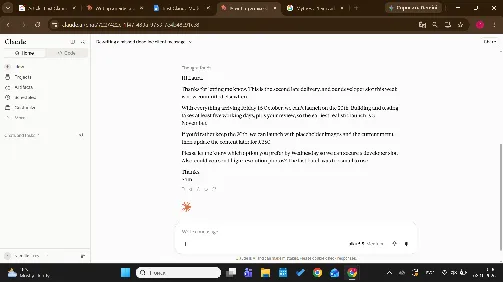
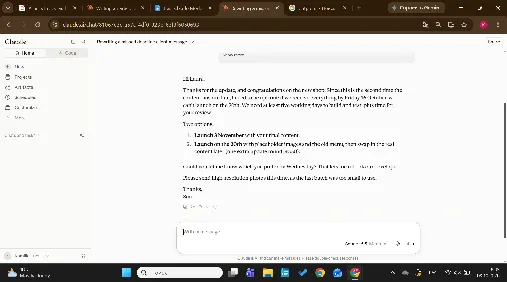
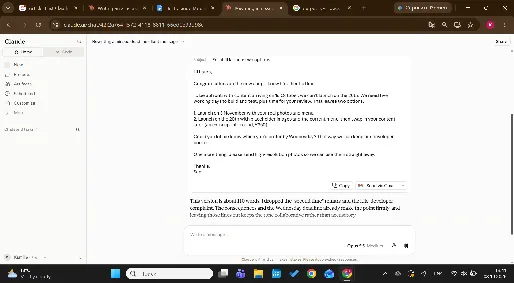
| Email: “Rewrite this reply to a client who missed a deadline. Firm but friendly, under 120 words” | Under the limit (111 words) with all key facts, but kept the “second late delivery” remark and invented a detail: the developer slot is “committed elsewhere” which the draft never said | Clearest structure, with the two options as a list and every fact kept, but it ran to 125 words, over the 120-word limit, and kept the “second time” remark. | All facts kept in 114 words, dropped the blame without being asked, and added a subject line. Ready to send as is. | Opus 5.5 was the only model to meet every condition. Haiku would need one factual fix, Sonnet a trim. For short client emails, Sonnet or Haiku plus a quick check is enough. Opus pays off when tone matters. |
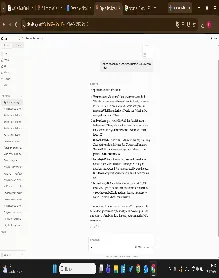
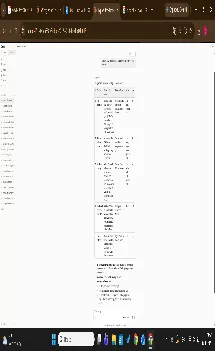
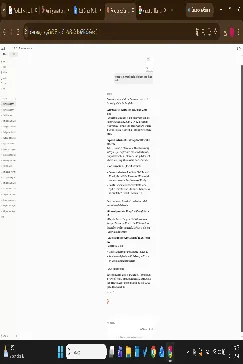
| Document: “Summarize this 20-page report into the five decisions it asks us to make, with page numbers” | Found all five decisions and skipped every distractor, but three of the five page references were off by one (p. 20 instead of p. 19 for the appendix item). | All five decisions with correct pages, sorted by deadline, and it pointed out that the executive summary mentions only two of them. | All five decisions with correct pages, sorted by deadline, with extra context on risks, and it flagged that one request was buried in the appendix. | Sonnet 5.5 matched Opus on accuracy, which makes it the better value for long-document summaries. Haiku is fine for pulling out the main points but needs its citations checked. |
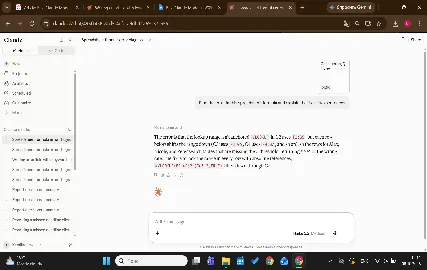
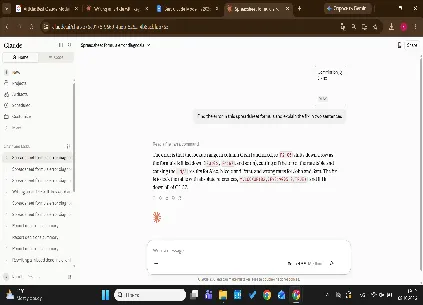
| Analysis: “Find the error in this spreadsheet formula and explain the fix in two sentences” | Correct cause and fix, and named all three broken rows. One loose claim: it said those rows could show a “wrong rate” when all three only return #N/A. | Correct cause and fix, but it said two reps had wrong rates when both rates were correct; they only looked suspicious because the broken formula happened to return the right tier. | Correct cause and fix, named all three broken rows, and made no mistakes. | All three models fixed the formula. Only Opus explained it without an error; Sonnet mistook correct values for broken ones. |
Task 1. Prompt
Rewrite this reply to a client who missed a deadline. Firm but friendly, under 120 words.
Context: I’m Sam, account manager at a web design studio. The client, Laura from Fernhill Bakery, was supposed to send product photos and menu text by 3 October.
Laura’s email:
“Hi Sam, so sorry, we’ve been flat out with the new shop opening. I can get you the photos and menu text by next Friday. We still launch on the 20th, right? Laura”
My draft reply:
“Hi Laura,
Thanks for getting back to me. I have to be honest, this is the second time the content has been late, and it’s really putting us in a difficult position. We agreed on 3 October in the project plan and we’ve had a developer booked for this week who now can’t do anything. If we get everything next Friday (16 October), there is no way we can launch on the 20th, because we need at least five working days to build the pages and test everything properly, and then you need time to review. Realistically the earliest launch would be 3 November. The other option is we launch on the 20th with placeholder images and the old menu, and swap in the real content later, but that means paying for an extra update round (£350). I really need you to tell me which option you want by Wednesday, otherwise we’ll lose our developer slot again. Also, can you please make sure the photos are high resolution this time, the last batch was too small to use.
Thanks,
Sam”
- Haiku 5.5 answer
- Sonnet 5.5 answer
- Opus 5.5 answer
Task 2. Prompt
“Summarize this 20-page report into the five decisions it asks us to make, with page numbers”.
- Haiku 5.5 answer
- Sonnet 5.5 answer
- Opus 5.5 answer
Task 3. Prompt
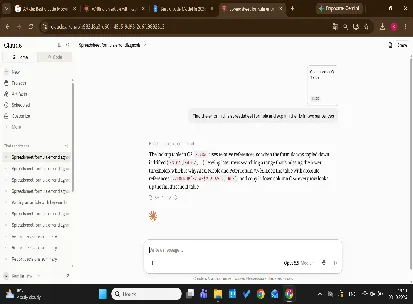
Find the error in this spreadsheet formula and explain the fix in two sentences
- Haiku 5.5 answer
- Sonnet 5.5 answer
- Opus 5.5 answer
Conclusion
In our run, Opus 5.5 was the only model with no mistakes across all three tasks. Sonnet 5.5 matched it on the long document but went over the word limit on the email and flagged correct values as errors in the spreadsheet. Haiku got the substance right every time but slipped on details, from an invented fact to wrong page numbers. One run per model is a small sample, so treat this as a reason to check cheaper models’ output, not as proof that you always need Opus.
When models are retired and names change
Most pages with Claude models explained go stale within weeks, because Anthropic retires older models on a regular schedule. Its deprecations page commits to at least 60 days’ notice before a publicly released model is retired. Claude Sonnet 4.5 is already deprecated and leaves the API on November 30, 2026. Claude Opus 4.1 was retired on August 5, 2026, and Opus 4 and 4.1 left the app’s model menu back in January.
Older models don’t disappear the moment a new one ships. Opus 5, Sonnet 5 and Haiku 4.5 are still active on the API, which is why you’ll still see them in developer tools. If you build a workflow on the previous mid-tier model, our Claude Sonnet 5 review shows where it started, and Anthropic lists it as active until at least June 30, 2027.
To stay current, check Anthropic’s models overview and release notes once a month, use aliases rather than dated model names where your tools allow it, and rerun your three-task test whenever a new model lands. The test takes 20 minutes and tells you whether the new release changes anything for your work.
Learn to brief any Claude model
Picking the model matters less than knowing how to brief it, and that skill carries over to every new release. Coursiv’s 28-Day AI Certificate Program helps you build that skill across AI tools, Claude included, and you finish with a certificate of completion. Coursiv’s catalog also includes a dedicated Claude course. See what the AI Certificate Program covers.